Social Campaign Reports
Social campaign reporting helps you understand how your campaigns are performing across channels, so you can focus on what delivers results. By bringing your data into one clear view, it shows which content resonates, which audiences engage, and where to optimise. With the right insights, you can improve campaign effectiveness, reduce wasted spend, and make confident, data-driven decisions.
If you want to report on multiple campaigns at once, you can create Custom Reports.
Viewing a Social Campaign Report
For every Social campaign you send from Transpond, a campaign report will be created. To view a report, go to:
- Campaigns > Email
- Click on the name of a finished campaign to open the report
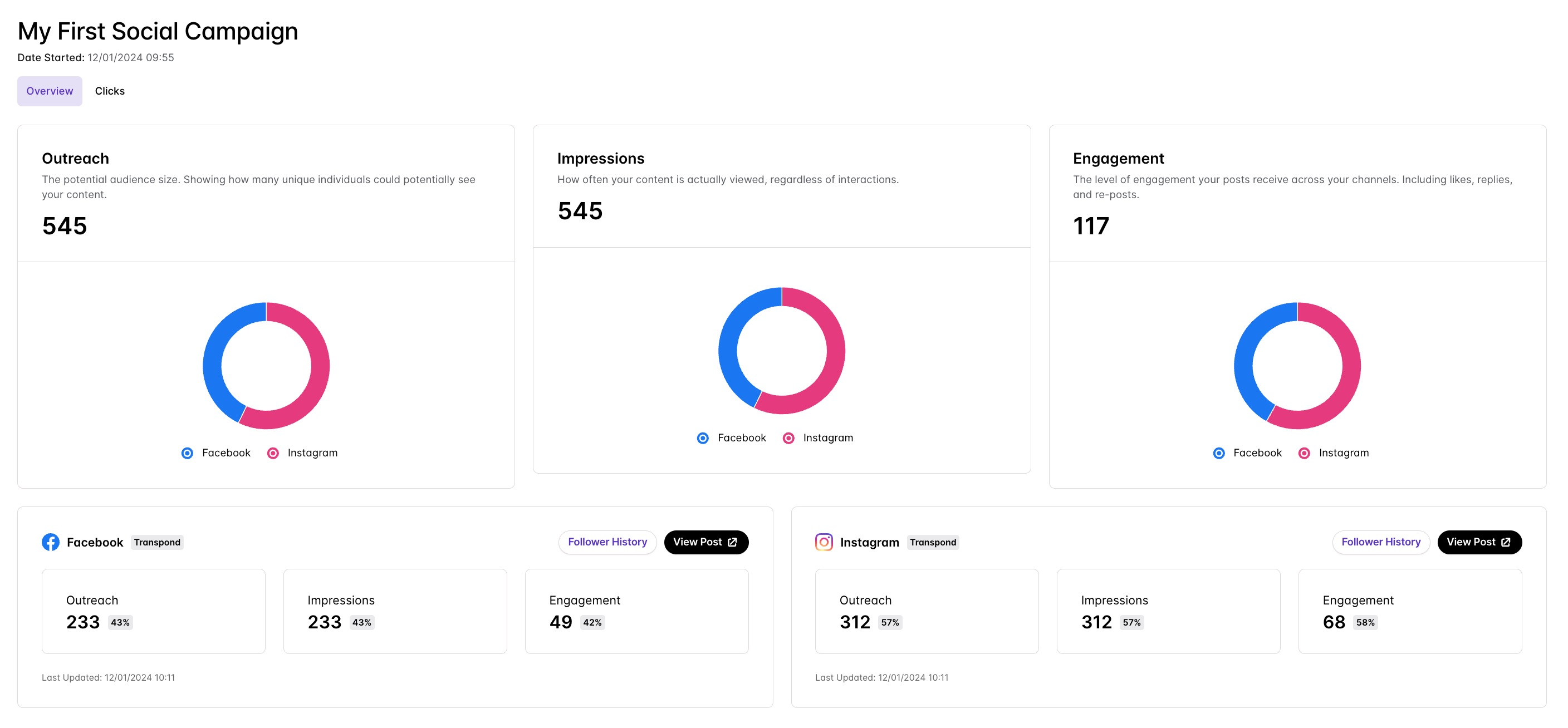
Understanding Social Campaign Reports
Overview - The Overview tab provides a snapshot of overall campaign performance with metrics for outreach, impressions and engagement.
Clicks - The Clicked tab provides a detailed view of which links in the campaign have been clicked, how many times each was clicked, and by whom.
Follower History
In the campaign analytics for each campaign, as well as monitoring the performance of that campaign, you can also view your Follower History by channel. This view allows you to see changes to your follower count over time, alongside recent campaigns, so you can see easily which social media campaigns had a positive (or negative) impact on your number of followers.
This view can also be accessed by clicking your profile image in the top right corner of the screen > Integrations > clicking Manage next to the social channel you'd like to view, then clicking History.