Automatically Keeping Your Contact List Up to Date
Keeping your contact lists accurate is an ongoing task. By combining regular list cleaning with automations, you can maintain a reliable audience without constant manual effort.
This helps ensure your campaigns reach the right people, improves engagement, and gives you more confidence in your reporting.
Who can use this feature? Anyone
Available on: Free, Starter, Growth, Advanced and Ultimate
Why Keeping Lists Up to Date Matters
Outdated or incorrect data can lead to sending emails to the wrong people, lower engagement, and misleading results.
Keeping your lists current helps you:
- Focus on contacts who are more likely to engage
- Avoid sending to invalid or uninterested contacts
- Reduce time spent fixing data manually
- Make better decisions using accurate information
Use List Cleaning to Fix Issues
List cleaning is useful for reviewing and correcting your data in bulk. This can include removing invalid email addresses, duplicates, or contacts who are no longer relevant.
📙 For detailed steps, see List Cleaning.
Use Automations to Keep Lists Updated
Automations help maintain list quality over time by updating contacts based on their activity and preferences. Once set up, they run in the background and reduce the need for manual updates.
Manage Inactive Contacts
Some contacts will stop engaging over time. Continuing to send to them can affect your results.
You can use automations to:
- Track engagement, such as opens or clicks over a period of time
- Identify contacts who are no longer active
- Move them to a separate segment or stop sending to them
This keeps your active lists focused on engaged contacts.
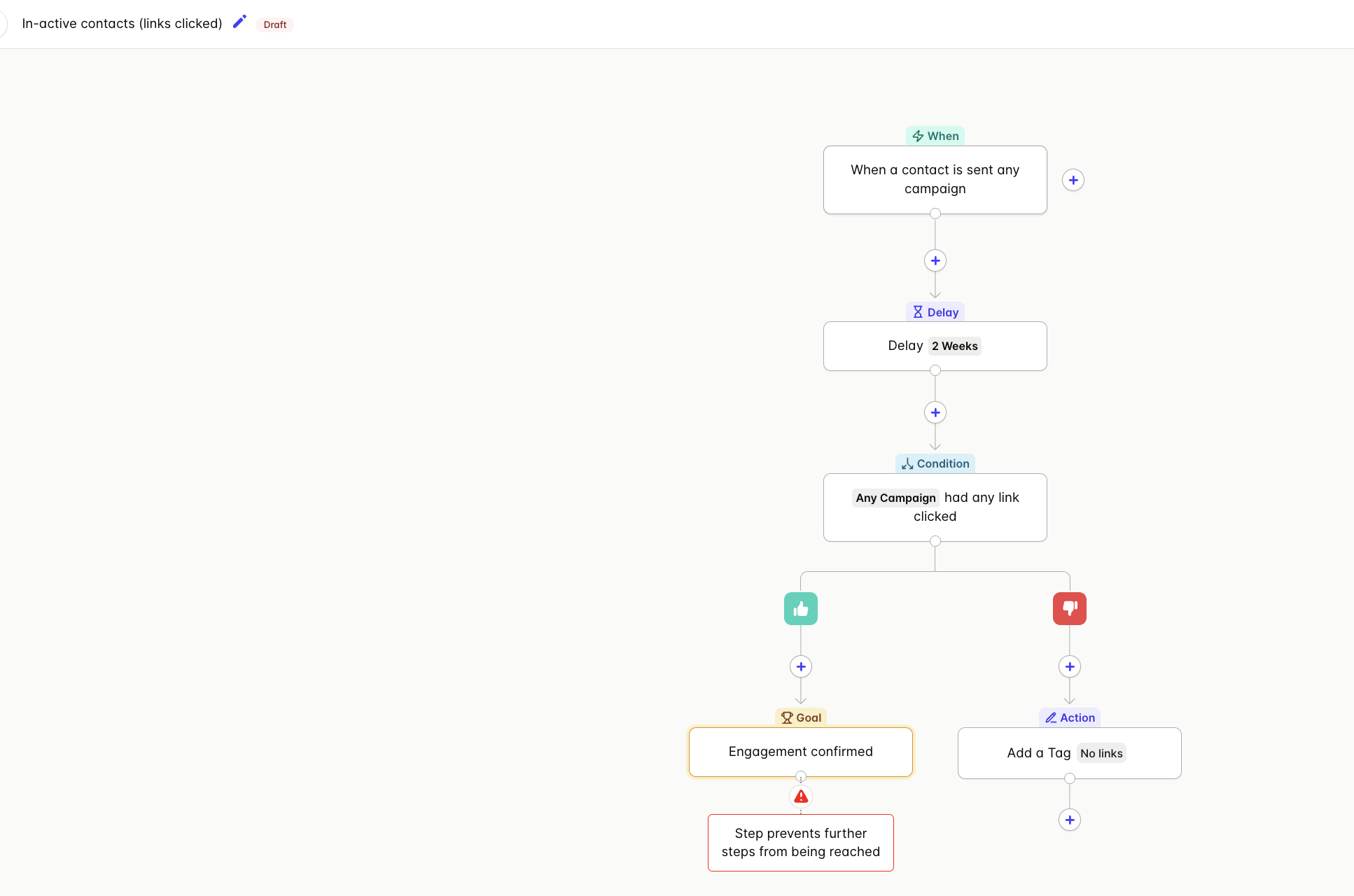
Keep Contact Data Accurate
Contact information changes as people interact with your emails or forms.
Automations can:
- Update contact fields when new information is provided
- Add or remove tags based on behaviour
- Keep segments aligned with the latest activity
This reduces manual updates and helps ensure your targeting stays relevant.
Keep Preferences in Sync
When contacts update their preferences, your lists should reflect those changes.
Use automations to:
- Add contacts to the correct lists based on their preferences
- Remove them from lists they no longer want
- Update tags when preferences change
This helps you send more relevant content and avoid unwanted emails.
Re-engage or Remove Unresponsive Contacts
Not all inactive contacts need to be removed immediately. Some may respond to a targeted follow-up.
A simple approach is to:
- Identify contacts who have not engaged recently
- Send a re-engagement campaign
- Remove or stop sending to contacts who remain inactive
📙 For detailed steps, see Build and Use Automations.
Keep It Simple
You do not need complex setups to keep your lists healthy. Start with a few key automations that:
- Track engagement
- Update contact data
- Manage preferences
Review your setup regularly and adjust as needed.
Summary
- Use list cleaning to review and fix data when needed
- Use automations to keep your lists accurate over time
Together, these approaches help you maintain a clean, engaged audience with less manual effort.