Gated Content Forms
Gated content forms help you turn valuable resources, like guides, videos, templates, or webinars, into a simple way to grow your audience. Instead of giving content away for free, you ask visitors to share their details (such as name and email) before they can access it.
This approach helps you build a list of interested subscribers while making sure your content reaches people who actually want it.
Why use a gated content form?
Gated content forms aren’t just about collecting emails, they help you build a more engaged audience.
- With the right setup, you can:
- Grow your subscriber list with people who are genuinely interested
- Capture high-quality leads for follow-up campaigns
- Deliver content automatically without manual work
- Keep your audience organized for future outreach
How gated content forms work in Transpond
In Transpond, gated content forms connect your content with your subscriber list and automation tools.
Here’s what happens when someone fills out your form:
- A visitor submits their details through your form
- Their information is added to your Transpond audience
- They are optionally tagged or segmented for future targeting
- The requested content is delivered automatically (for example, via email or a confirmation page)
This means you can consistently deliver content while keeping your audience data clean and actionable.
When to use gated content
Gated content works best when what you’re offering feels valuable and worth the exchange.
Common examples include:
- Downloadable guides or ebooks
- Exclusive videos or webinars
- Templates, checklists, or tools
- Research reports or case studies
If the content helps solve a real problem or saves time, people are much more likely to sign up.
Best practices for better results
A few small changes can make a big difference in how many people complete your form.
- Keep forms simple. Only ask for the information you truly need. Shorter forms lead to higher completion rates.
- Be clear about the value. Explain exactly what the subscriber will get and why it’s useful.
- Set expectations. Let people know what happens next—whether they’ll receive an email, be redirected, or get instant access.
- Deliver immediately. The faster someone receives the content, the better their experience.
- Use tags or segments. Organizing subscribers based on what they requested makes it easier to send relevant follow-ups later.
How this helps your team
Gated content forms reduce manual work and make it easier to scale your outreach.
Instead of sending content one-by-one or tracking requests manually, Transpond handles delivery and organization for you. This saves time, reduces errors, and gives you a clearer view of who your audience is and what they care about.
Setting up Gated Content and next steps
To setup a form with Gated Content - you'll need to
- Go to Websites in the top menu, then select Forms
- Click + Create Form
- Choose which Group new submissions should be added to (or create a new one)
This ensures every submission is stored in the right place from the start.
- Select the Gated Content form option
- Click +Add Content to add the file you'd like to have as the gated content, or select the 'link' option, to enter a URL you'd like to link to instead.
- Select the option you'd like to choose for what point you'd like for the visitor to gain access to your gated content, i.e. in a conformation email (recommended), after for submission, or on a landing page you select.
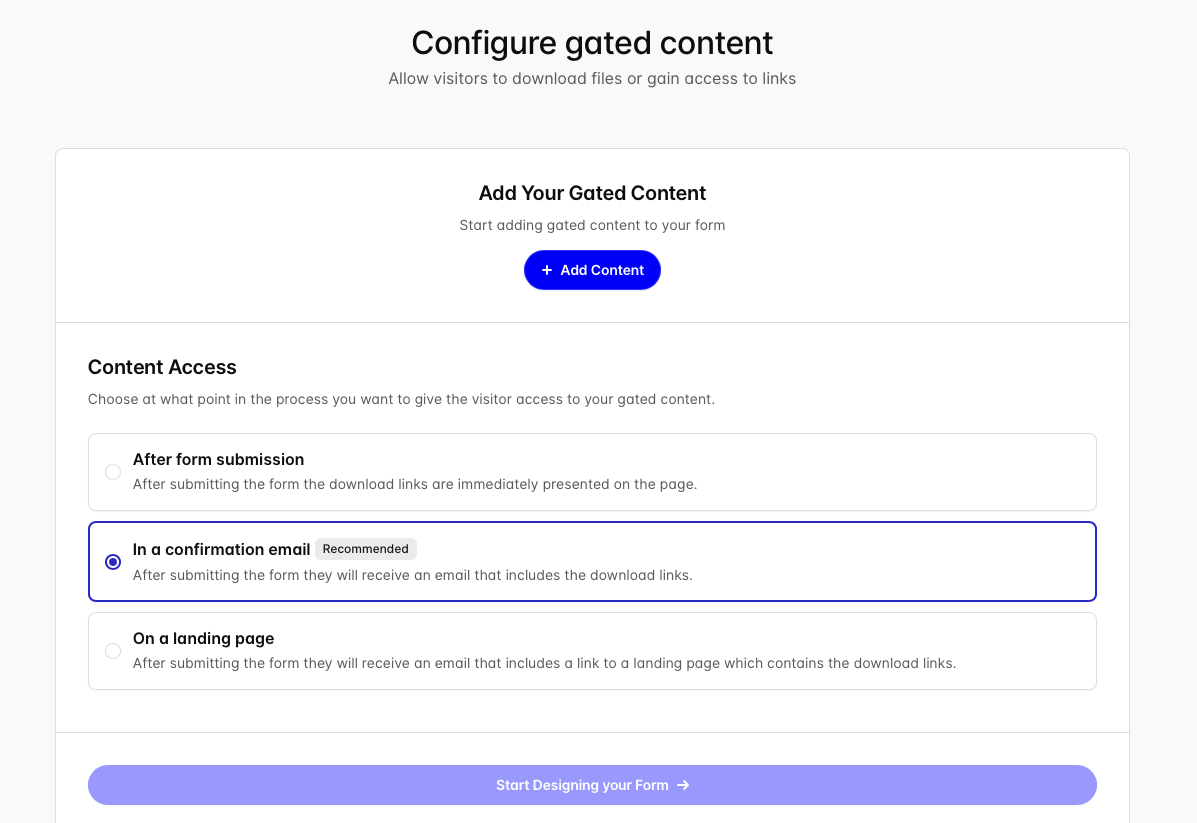
- Once you select those options, you can click 'Start Designing your Form' - and you can then follow along the standard form building process, which you can see those instructions in our article for that here
Once your gated content form is live, you can:
- Create follow-up email sequences to nurture new subscribers
- Track performance to see what content attracts the most interest
- Refine your forms to improve conversion over time
By combining strong content with a simple form experience, you can steadily grow a more engaged and valuable audience.