GDPR Compliance
The General Data Protection Regulation (GDPR) is a comprehensive European Union law regulating data privacy and security, effective since May 25, 2018. GDPR and UK GDPR compliance is a legal requirement for anyone marketing to or processing the data of individuals in the EU or UK.
Even if your business isn’t legally required to follow GDPR or UK GDPR, adopting similar principles will lead to better outcomes as it helps you to; protect privacy, build trust, and improve deliverability.
Who can use this feature? All Staff
Available on: Free, Starter, Growth, Advanced and Ultimate
GDPR isn’t just a legal requirement; it also helps you run email marketing that is ethical, effective, and trusted by your audience. It helps:
- Protect privacy – only email people who’ve explicitly agreed to receive messages.
- Build trust – clear consent and easy unsubscribe options show you respect your audience.
- Reduce legal risk – avoid fines by staying compliant with data rules.
- Improve data quality – consent-based lists are accurate and engaged, boosting campaign results.
- Encourage better marketing – transparency and thoughtful messaging lead to more relevant, effective emails.
A key principle of the GDPR and UK GDPR requires that you obtain consent from contacts before using their personal details for marketing purposes. In addition to obtaining consent, you should make it clear to your subscribers how you will process their data and what they can expect to receive from you.
Transpond is designed to help you manage your marketing activities in a way that supports GDPR requirements. It gives you clear controls over how you collect, store, and use personal data, helping you reduce risk and build trust with your audience.
GDPR - Signup Forms
Transpond makes it easy to capture and record user consent at the point of data collection. It also uses double opt-in and fully customisable signup forms to build trust when contacts decide whether to share their details.
By default, all signup forms in Transpond use double opt-in confirmation for new signup form submissions. When a contact signs up via your form, double opt-in adds an extra step by sending an email to the contact, asking them to confirm the signup by clicking a link in the email. Only once the contact has clicked the link to opt-in to your email marketing will the contact be 'Active' in Transpond.
When creating a signup form in Transpond, after you have designed the form, at the fourth step of the Signup Form wizard, you can set the subject line for the confirmation email and the email address from which the email will be sent.
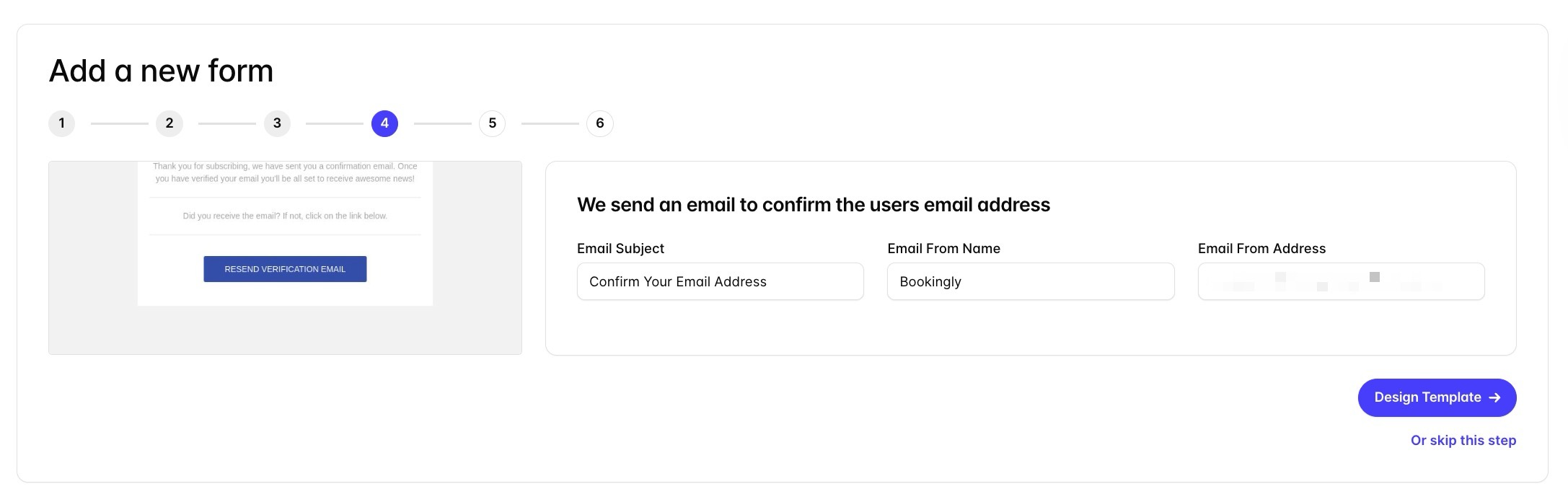
You can customize the design and the content of the email to match your brand. Using your brand colours and logo within the email will help contacts identify you as the sender of the email and help establish trust from the outset.
If you skip this step and send mass emails from the linked Group, this won’t comply with GDPR. After clicking the Edit/Deploy button on a Form, you’ll have the option to enable the confirmation step for any existing Forms.
📙 Read more about Sign Up Forms.
GDPR - Campaigns
If you’re emailing new contacts for the first time, you can ask them to reconfirm their subscription and make sure they’re happy to keep getting emails from you. To do this:
- Go to the Blocks section of the drag-and-drop editor
- Choose the GDPR Confirmation option
- This block will contain text plus two buttons, each linked to specific merge tags. At this point, you can change the design and colors to fit with your company branding and tone:
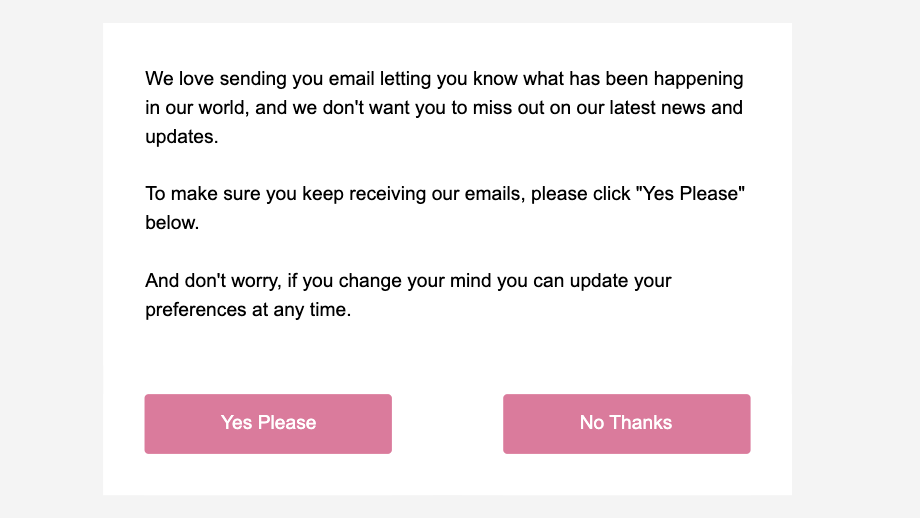
When a contact clicks on one of the options in this block, it will automatically create a set of custom fields to record consent, source and date for the Contact. Those fields are:
- GDPR Confirm Date - The date the Contact confirmed their status
- GDPR Confirm Source - The source (Campaign ID) of where they confirmed their status
- GDPR Confirmed - Opted in / Opted out
When making any design edits to the GDPR Confirmation block, it's important not to change the Merge Tags linked to the buttons. Transpond uses these to create the custom fields mentioned above.