Buying a Domain Through Transpond
If you do not have a domain that you can configure to support email sending via Transpond or if you do not want to update DNS records on your main domain, you can purchase a domain directly in Transpond to use as your email sending domain, without needing to configure anything yourself.
Once purchased, we automatically handle all the required DNS setup so your domain is ready for email marketing straight away.
All domains are registered by Transpond and cannot be transferred to you.
Who can use this feature? Admin Role
Available on: Free, Starter, Growth, Advanced and Ultimate
How to buy a domain through Transpond
- Go to Account Settings > My Domains
- Choose Buy Domain

- Enter your chosen domain name, e.g.
Bookingly.com. Transpond will then run a check to see if it is available to buy. - Once you have found an available domain that you want, select Continue
- Under the Purchase this Domain heading, review the domain details and the annual cost
- Select a payment method to complete the purchase.
You will be billed automatically, on an annual basis, for the domain. You can stop the renewal at any time by simply deleting the domain - read more in the section below.
How do I remove a domain I bought on Transpond?
- Go to Account Settings > My Domains
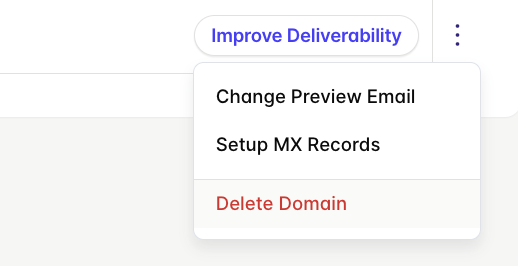
- To the far right of your purchased domain, choose the three dots icon
- Select Delete Domain
- Confirm to complete the deletion of your domain.
Your domain will be deleted and will no longer renew each year.