Restrict Open Tracking
Regulators in France (the CNIL) and Italy (the Garante) have both ruled that email open tracking pixels require the recipient's prior consent, the same way a marketing cookie would. If you have contacts based in either country, you'll need to review your tracking setup.
Key dates
- 14 July 2026: CNIL (France) deadline for informing existing recipients and giving them a chance to object has passed.
- 28 October 2026: Garante (Italy) six-month compliance deadline.
No other EU country has published equivalent guidance yet, but since both rulings rest on EU-wide ePrivacy principles, it's worth assuming the rest of the EU may follow.
Who's affected
This is based on the recipient's location, not where you send from. If any of your contacts are in France or Italy, this applies to you regardless of where your business is based.
What needs consent, and what doesn't
Needs prior consent:
- Open tracking used to measure campaign performance
- Open data used for profiling or lead scoring
- Opens used to trigger automations (e.g. resending to non-openers)
Doesn't need consent (within limits):
- Tracking used purely for list hygiene (e.g. suppressing inactive contacts)
- Fraud detection and authentication signals
- Fully anonymized, aggregated statistics where no individual can be identified
Consent to receive your emails and consent to be tracked are two separate things, one doesn't imply the other.
How to manage open tracking in Transpond
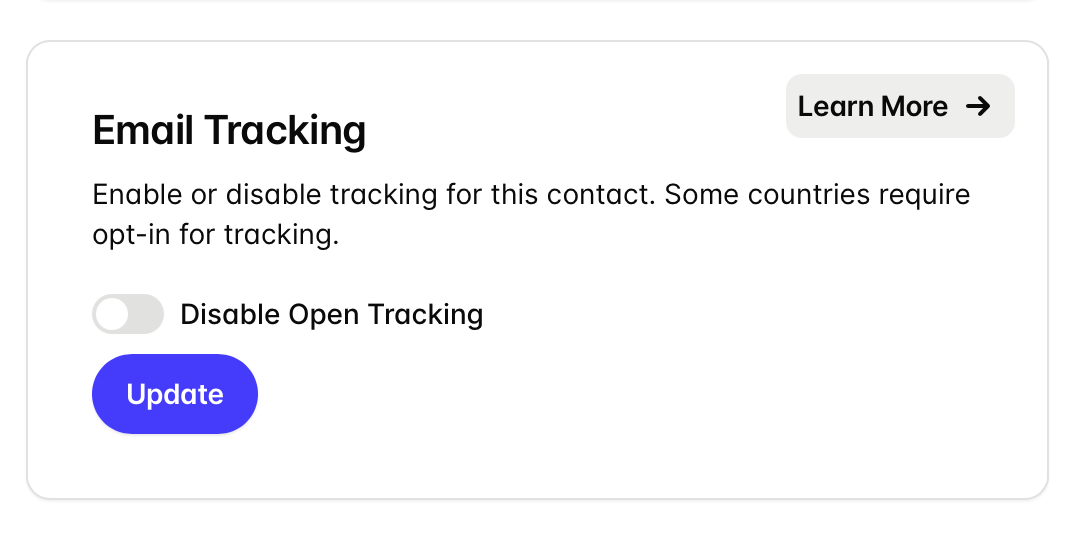
Disable open tracking for a single contact
Each contact record has a toggle for this:
- Go to the contact's record.
-
On the bottom left side there is a switch to Disable open tracking.
Disable tracking for a list of contacts at once
For a group of contacts at once (e.g. everyone in a Segment of French or Italian contacts):
- If you don't already have one, create a Segment for the contact you want to disable tracking for:
- Go to Contacts > Segments > Add Segment > setup the filters you need and save the segment
- Go to Contacts > Use the 'Segment' drop down menu to choose the segment you want to disable tracking for.
- Use the Select All check box and then click the Change Status option > select Open Tracking Disabled
- Finally, confirm using the Change Status button.
In that same bulk action there's an option to re-enable tracking for a Segment if needed.
Turning off tracking for a single send
If you'd rather not change a contact's tracking status permanently, every campaign also has advanced options for a one-off send:
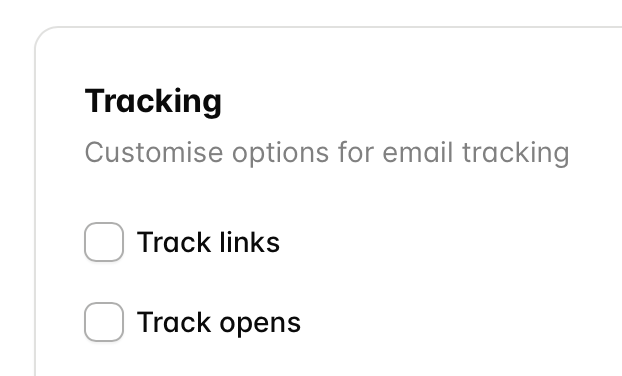
- When creating a Campaign, in Step 1, enable the option to Show Advanced options.
-
Untick Track opens and/or Track link clicks.
- Send as normal.
If you don't know where your contacts are based
If your signup forms don't collect location data, segmenting by country isn't reliable. In that case, it's safer to disable tracking for your whole list than to guess. Going forward, add a country field to signup forms so new contacts can be segmented accurately.
Check your automations
If any automations trigger off opens or clicks, and you stop tracking part of your audience, those triggers won't fire for the contacts who are no longer tracked. Review active automations and consider switching to triggers based on actions contacts take directly (joining a group, filling in a form, clicking a button etc) rather than tracking-based triggers.
What this means for reporting
Historical tracking data isn't affected — this only changes what can be collected going forward. Expect reported open and click rates to dip for audiences where tracking is disabled; this reflects a smaller tracked population, not necessarily worse performance. Other engagement signals that don't rely on individual tracking can help fill the gap:
- Website visits — via UTM parameters on campaign links, or Transpond's Site Tracking
- Conversions — purchases, bookings, signups
- Replies — via Transpond's Reply Tracking/Conversations
- Unsubscribes — a direct signal